
Benchmark Any Linux Server: Step-by-step Guide

Introduction
Buying a VPS or racking a new node feels great until the first slow disk or noisy neighbour shows up. Benchmarking is not about enjoying progress bars — it is about surprises staying in lab experiments, not in production migrations.
This guide is a practical checklist: a quick overall picture with YABS, a lightweight RAM sanity check with Sysbench, and deep storage tests with fio, including notes for hypervisors such as Proxmox VE where pools, caches, and alignment matter.
Use cases
- New lease: You just rented a VPS or dedicated machine and want to check whether you received a problematic box before you depend on it.
- Troubleshooting: Application performance has degraded and you want to rule out hardware (CPU, RAM, disk, network) before you chase code or config alone.
- Comparison: You want a repeatable way to compare two servers (same commands, same methodology, comparable outputs).
Prerequisites
- Shell access as root or sudo on the target Linux host.
- Distribution: The author runs Debian-family systems (including Ubuntu). Install commands use
apt; adapt package names and paths if you use another family (RHEL, Arch, etc.). - Enough free disk space for
fiotest files (commands below use up to 160 GB where noted — pick a fast scratch path like/tmponly if it can hold the file). - Patience: storage tests can take minutes to tens of minutes; avoid peak traffic windows on shared storage.
YABS — one script, broad overview
Yet Another Bench Script bundles CPU tests, basic disk IO, and network throughput (including iperf3 to public endpoints).
curl -sL https://yabs.sh | bash -s -- -rThe -r flag reduces how many iperf locations are used — handy when you care more about disk and CPU than chasing every possible network peer.
Skim the summary at the end: it is not a substitute for careful fio methodology, but it is an excellent first pass before you spend an evening tuning queues and block sizes.
Sysbench — quick memory probe
Install once:
apt install sysbenchRun the built-in memory benchmark:
sysbench memory runTreat this as a sanity check, not a certification: if numbers look wildly off compared to another machine with similar RAM, investigate before trusting heavier results.
Proxmox and fio — serious disk characterization
On hypervisors such as Proxmox VE, storage performance depends on pool topology, caching, alignment, and whether tests hit ZFS ARC, LVM cache, or raw devices. Run tests when the array is otherwise idle, and delete test files afterwards to reclaim space.
Below, commands assume you run them from a directory on the volume you care about (adjust paths as needed).
Sequential write (baseline saturation)
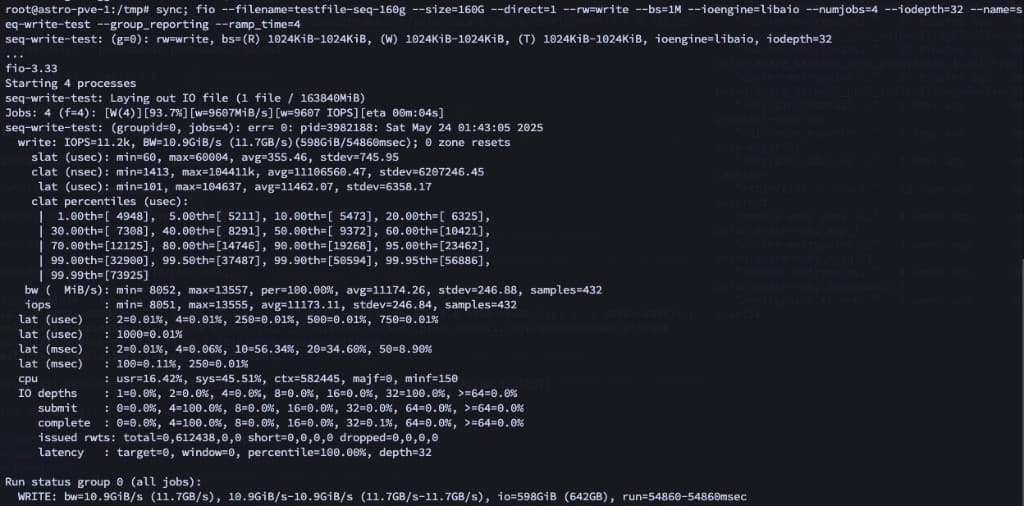
This pattern stresses large-block sequential writes — useful to see how fast the stack absorbs streaming writes.
sync; fio --filename=testfile-seq-160g --size=160G --direct=1 --rw=write --bs=1M --ioengine=libaio --numjobs=4 --iodepth=32 --name=seq-write-test --group_reporting --ramp_time=4Example output from one run (your numbers will vary with hardware and tuning):
Sequential read — four workers
sync; fio --filename=testfile-seq-160g --size=160G --direct=1 --rw=read --bs=1M --ioengine=libaio --numjobs=4 --iodepth=32 --name=seq-read-test --group_reporting --readonly --ramp_time=4--readonly avoids accidental writes if the dataset already exists.
Random write — sustained random 4K
Creates (or overwrites) a smaller footprint but hammer random write patterns typical of busy VMs:
sync; fio --filename=testfile-rand-4g --size=4G --direct=1 --rw=randwrite --bs=4k --ioengine=libaio --numjobs=4 --iodepth=32 --name=rand-write-test --group_reporting --ramp_time=4 --time_based --runtime=300Random read — same footprint
Use the file produced above (or include --size=4G so fio creates it consistently):
sync; fio --filename=testfile-rand-4g --size=4G --direct=1 --rw=randread --bs=4k --ioengine=libaio --numjobs=4 --iodepth=32 --name=rand-read-test --group_reporting --readonly --ramp_time=4Mixed random read/write — “database-ish” profile
Rough 70/30 read/write mix at 8K block size with eight jobs — a coarse approximation of concurrent OLTP-style chatter:
sync; fio --filename=database-testfile --size=4G --direct=1 --rw=randrw --bs=8k --ioengine=libaio --iodepth=32 --numjobs=8 --rwmixread=70 --name=db-mixed-rw-test --group_reporting --ramp_time=4Heavy concurrency — many workers, larger blocks
Simulate many parallel readers/writers (think analytics jobs or batch ETL):
sync; fio --filename=testfile-seq-readwrite --size=160G --direct=1 --rw=readwrite --bs=64k --ioengine=libaio --iodepth=16 --numjobs=16 --name=multi-thread-app --group_reporting --ramp_time=4Watch latency percentiles, not only headline bandwidth: a pretty GB/s number with awful tail latency will still feel sluggish under real workloads.
How I read the numbers
direct=1: bypasses page cache so you measure the storage path, not “RAM pretending to be disk”.iodepthandnumjobs: higher values expose controller and queue behaviour; mismatch with real workloads can either inflate or hide problems — tune profiles to match what you actually run.- Compare apples to apples: same kernel, same storage stack (ZFS, LVM, etc.), same time of day — then compare before/after firmware or disk changes.
Cleanup
Remove artefacts when finished:
rm -f testfile-seq-160g testfile-rand-4g database-testfile testfile-seq-readwriteClosing thoughts
Benchmarking is less about bragging rights and more about trust: knowing how your stack behaves before users or VMs depend on it. Keep your favourite commands in a snippet manager, attach representative outputs to tickets or runbooks, and rerun the suite whenever the hardware story changes.
A few habits that pair well with the use cases above:
- Before you promote a machine: confirm CPU, RAM, network, and disk line up with what the spec sheet or provider claims.
- After hardware changes: capture numbers before and after (new SSDs, RAID layout, kernel upgrade) so regressions are obvious.
- Documentation: save command outputs so future-you remembers what “healthy” looked like on that host.