
My macOS key repeat settings for faster coding

Introduction
Stock macOS keyboard behaviour is fine for casual use, but when you spend hours in terminals and editors, the gap shows up quickly: holding arrow keys, backspace, or vim-style navigation can feel slower than what you remember from other desktops.
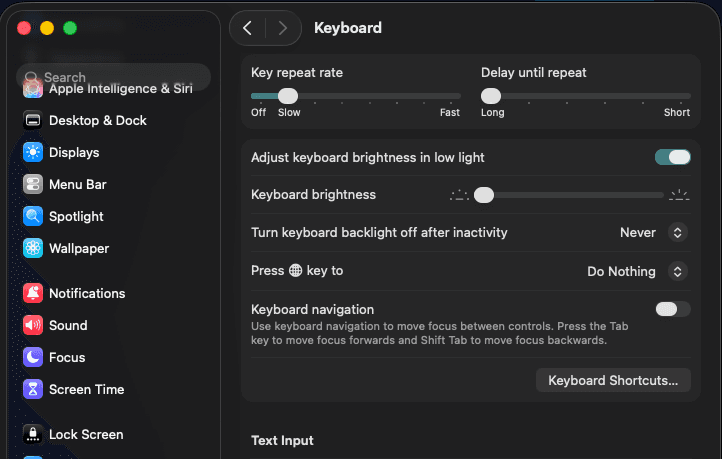
This note documents my personal defaults on macOS: two defaults write tweaks that push key repeat and delay-before-repeat below what System Settings → Keyboard exposes. The goal is not “gaming keyboard RGB” bragging — it is a slightly more responsive typing surface for everyday programming.
Why I bother
- Editor ergonomics: long sessions with arrow keys, word navigation, and repeated deletes feel less “sticky” when repeat ramps up sooner.
- Cross-platform muscle memory: if you still switch between Windows or Linux and macOS, aligning repeat behaviour reduces friction when you context-switch machines.
- Low risk, easy rollback: you are only adjusting global preferences; reverting is a pair of writes plus another session restart.
Before you change anything
- Administrator mindset: you run commands as your user; they affect your account’s defaults. Know what you type before you paste.
- Session restart: macOS applies these fully after you log out and log back in (in practice, restarting the graphical session is usually enough).
- Comfort check: if the cursor flies too fast afterwards, bump the integers slightly toward Apple’s minimums (see the comments in each block).
Initial delay — how long before repeat starts
Apple’s UI maps this preference to InitialKeyRepeat (lower is faster). I set it one step faster than the normal minimum the GUI offers.
defaults write -g InitialKeyRepeat -int 12 # normal minimum is 15 (225 ms)Repeat rate — how fast characters repeat
KeyRepeat controls the interval between repeated characters while you hold a key. I set it to 1 (the fastest step in this scale).
defaults write -g KeyRepeat -int 1 # normal minimum is 2 (30 ms)Apply and sanity-check
- Run both commands in Terminal (order does not matter).
- Log out and log back in so WindowServer picks up the new timing end-to-end.
- Open your editor of choice, hold an arrow key, and decide whether the speed still feels comfortable for precision or slightly too aggressive.
Source and discussion: Apple Stack Exchange — How to increase keyboard key repeat rate on OS X.
Closing thoughts
These two lines are a small change, but they are one of those quality-of-life adjustments that pay off every day you code on a Mac. If you share dotfiles or onboarding docs for new machines, drop the blocks in verbatim—future-you will thank present-you after the next clean install.
If anything feels too twitchy after a week, treat the integers as tunable constants: nudge InitialKeyRepeat upward for a longer pause before repeat kicks in, or KeyRepeat upward for a slightly slower stream of characters.